
I designed a detailed prompt for the end-to-end design process which covers research to handoff. This took me almost a month to test and refine it works perfectly. Took my 4 weeks of weekly token limit to test till it reached to this point a well refined.
(This works with all AI agents but I tested and run with the Claude Sonnet 4.5, 4.6) and Opus 4.7) Hope this template will save your time…
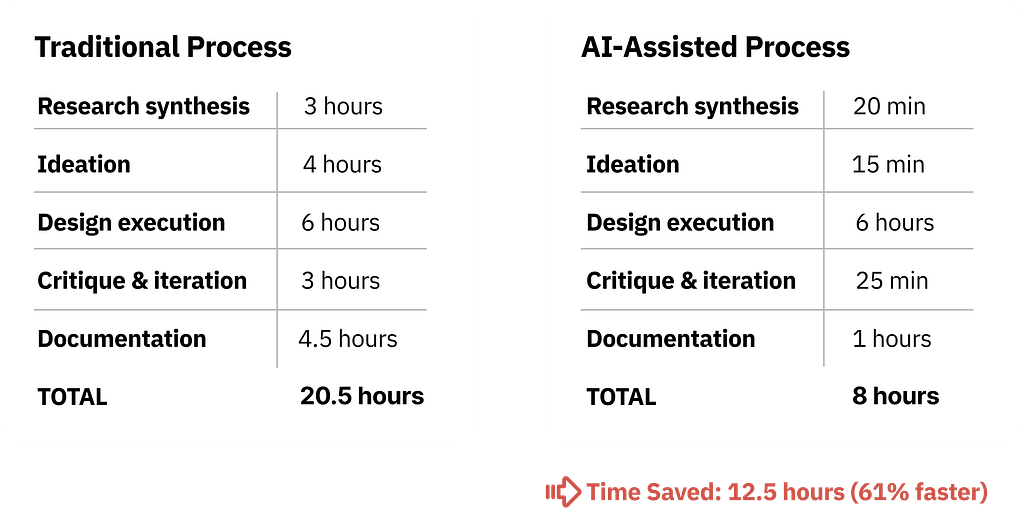
Reusable Templates for Any Product Design Project
PROMPT 1: USER RESEARCH SYNTHESIS
I'm a Senior Product Designer conducting user research synthesis.
I've uploaded [NUMBER] user interview transcripts and need a comprehensive
analysis to inform my design decisions.
PROJECT CONTEXT:
- Product: [DESCRIBE YOUR PRODUCT]
- Feature/Problem area: [WHAT YOU'RE DESIGNING]
- Target users: [WHO YOUR USERS ARE]
- Use cases: [PRIMARY USE CASES]
- Current state: [HOW USERS HANDLE THIS TODAY]
INTERVIEW DETAILS:
- Number of interviews: [NUMBER]
- Duration: [AVERAGE TIME]
- Format: [STRUCTURED/SEMI-STRUCTURED/OPEN]
- Participant profile: [WHO YOU INTERVIEWED]
YOUR TASK:
Analyze these transcripts with the rigor of a UX researcher preparing design requirements. Extract actionable insights that will directly inform interface design, interaction patterns, and technical requirements.
---
ANALYSIS FRAMEWORK:
## 1. PAIN POINTS (Current State Problems)
Extract and categorize every problem, frustration, or inefficiency mentioned. For each pain point:
**A. QUOTE THE EXACT PROBLEM:**
- Use direct quotes from transcripts (cite participant + paragraph)
- Preserve user language (don't paraphrase unless clarifying)
**B. FREQUENCY & SEVERITY:**
- How many participants mentioned this? (X/[total])
- Severity rating based on user language:
  - CRITICAL: "I can't do my job", "This blocks me", "I waste hours"
  - HIGH: "Very frustrating", "Major issue", "Happens constantly"
  - MEDIUM: "Annoying", "Wish this was better", "Slows me down"
  - LOW: "Minor inconvenience", "Not a big deal"
**C. CONTEXT OF OCCURRENCE:**
- When does this pain point surface? (specific workflow step)
- How often? (daily, weekly, monthly, rare)
- What triggers it? (task type, scale, user role)
**D. CURRENT WORKAROUNDS:**
- How do users cope now?
- What manual processes have they created?
- What external tools do they use?
**E. THEME GROUPING:**
Group related pain points under categories such as:
- Efficiency/Speed Issues
- Error Prevention/Safety Concerns
- Lack of Visibility/Feedback
- Cognitive Load/Mental Overhead
- Technical Limitations
- Permission/Access Issues
- Mobile/Device Constraints
- Collaboration/Team Coordination
- [ADD CATEGORIES SPECIFIC TO YOUR PRODUCT]
FORMAT EXAMPLE:
THEME: [Theme Name]
PAIN POINT: [Pain Point Title]
- Quote: “[Exact user quote]” ([Participant], para [#])
- Frequency: [X/Total] participants
- Severity: [Critical/High/Medium/Low]
- Context: [When and how often it occurs]
- Workaround: [Current coping mechanism]
- Impact: [Time/cost/frustration]
## 2. MENTAL MODELS (User Expectations & Analogies)
Identify how users THINK about this problem space. This reveals their existing assumptions and expectations.
**A. DIRECT ANALOGIES:**
- What tools/experiences do they compare this to?
- Quote exact analogies: "It should work like [X]"
**B. CONCEPTUAL MODELS:**
- How do they describe the ideal flow? (step-by-step)
- What metaphors do they use?
- What visual representations do they mention?
**C. INTERACTION EXPECTATIONS:**
- Expected input methods
- Expected feedback
- Expected safety mechanisms
**D. ROLE-BASED DIFFERENCES:**
- Do power users think differently than occasional users?
- Do different roles expect different capabilities?
FORMAT EXAMPLE:
MENTAL MODEL: [Model Name]
User Quote: “[Exact analogy or expectation]” Participant: [Name + Role] Referenced Features: [What they expect] Interaction Expectations: [How they expect it to work] Cross-referenced by: [X/Total participants mentioned similar]
## 3. EDGE CASES & FAILURE SCENARIOS
Extract every "what if" scenario, error condition, or failure mode mentioned.
**A. USER-MENTIONED EDGE CASES:**
- Quote exactly what they said
- Categorize by type:
  - USER BEHAVIOR: Accidental actions, confusion, mistakes
  - SYSTEM CONSTRAINTS: Timeouts, permission changes, technical limits
  - DATA ISSUES: Invalid items, duplicates, dependencies, conflicts
  - PARTIAL FAILURES: Some succeed, others fail
**B. FREQUENCY RANKING:**
- How many participants mentioned this scenario?
- Did they describe it as common or rare?
**C. CURRENT IMPACT:**
- What happens today when this edge case occurs?
- How do they recover?
- What's the cost?
**D. IMPLICIT EDGE CASES:**
- Read between the lines: what risks are implied but not stated?
FORMAT EXAMPLE:
EDGE CASE: [Scenario Title]
User Quote: “[Exact user quote]” Frequency: [X/Total] participants Type: [USER BEHAVIOR/SYSTEM/DATA/PARTIAL FAILURE] Scenario: [Detailed description] Current Impact: [What happens now] Severity: [Critical/High/Medium/Low] Design Implication: [What design must address]
## 4. SUCCESS CRITERIA (Definition of "Working Well")
Extract both explicit and implicit measures of success.
**A. EXPLICIT METRICS:**
- Direct quotes about measurable success
- Time saved, error reduction, task completion
- User satisfaction indicators
**B. TASK COMPLETION CRITERIA:**
- What does "done" look like?
- What confirmation do they need?
- What should they be able to do after?
**C. QUALITY INDICATORS:**
- Accuracy (no mistakes)
- Speed (faster than current method)
- Confidence (trust the system)
- Learnability (easy first time, easier second time)
**D. COMPARATIVE BENCHMARKS:**
- Compared to what? (current process, competitor tools)
- What's the target improvement?
FORMAT EXAMPLE:
SUCCESS METRIC: [Metric Name]
User Quote: “[Exact user quote about success]” Measurement: [How to measure] Target: [Specific goal] Frequency: [X/Total] participants mentioned Validation Method: [How to verify in testing]
---
## 5. CROSS-CUTTING INSIGHTS
**A. PATTERNS ACROSS PARTICIPANTS:**
- What did ALL participants mention? (universal needs)
- What did most mention? (strong signals)
- What did only one mention but feels critical? (edge innovation)
**B. CONTRADICTIONS:**
- Where do user needs conflict?
- How might we design for both?
**C. UNSTATED ASSUMPTIONS:**
- What are they assuming exists but not saying?
- What features are they NOT asking for?
**D. PRIORITY RANKING:**
- Top 5 must-haves (frequency + severity)
- Nice-to-haves
- Out of scope for v1
---
## OUTPUT FORMAT:
# RESEARCH SYNTHESIS: [Feature Name]
## PAIN POINTS (Grouped by Theme)
[Organized by themes, prioritized by severity]
## USER MENTAL MODELS
[Each model documented in detail]
## EDGE CASES & FAILURE SCENARIOS
[Categorized by priority: Critical / High / Medium / Low]
## SUCCESS CRITERIA
[Measurable metrics + qualitative indicators]
## CROSS-CUTTING INSIGHTS
[Universal needs, contradictions, priority ranking]
## DESIGN IMPLICATIONS (Recommendations)
1. Core interaction model recommendation
2. Critical safety mechanisms needed
3. Feedback/visibility requirements
4. Mobile/responsive considerations
5. Error handling strategy
6. V1 scope recommendations
7. V2/V3 deferrals
---
IMPORTANT INSTRUCTIONS:
1. Be exhaustive - don't skip details
2. Use exact quotes - preserve user language
3. Quantify everything - frequency, severity, impact
4. Highlight contradictions - call out conflicts
5. Think like a designer - connect insights to design decisions
6. Be skeptical - flag discrepancies between stated and observed
7. Connect dots - link pain points to mental models to success
8. Prioritize ruthlessly - critical vs. nice-to-have
Now analyze the [NUMBER] uploaded interview transcripts using this framework.
PROMPT 2: COMPETITIVE ANALYSIS
I'm a Senior Product Designer conducting competitive research.
I've uploaded [NUMBER] screenshots showing how competitors handle
[FEATURE/PROBLEM AREA].
PROJECT CONTEXT:
- Product: [YOUR PRODUCT TYPE]
- Feature being analyzed: [SPECIFIC FEATURE]
- Target users: [YOUR USER BASE]
- Goal: Identify market patterns, gaps, and differentiation opportunities
COMPETITORS UPLOADED:
1. [COMPETITOR 1 NAME]
2. [COMPETITOR 2 NAME]
3. [COMPETITOR 3 NAME]
4. [COMPETITOR 4 NAME]
5. [COMPETITOR 5 NAME]
YOUR TASK:
Analyze each competitor's implementation with the rigor of a UX researcher and competitive strategist. Extract patterns that inform our design decisions and identify market gaps we can exploit.
---
ANALYSIS FRAMEWORK:
## 1. COMMON PATTERNS (Table Stakes)
For each pattern present in 3+ competitors, document:
**A. PATTERN NAME & DESCRIPTION:**
- What is this pattern called?
- How does it work? (interaction sequence)
- Where is it positioned in the UI?
**B. IMPLEMENTATION VARIATIONS:**
- How does each competitor implement it differently?
- What's the most common approach?
**C. EVIDENCE:**
- Reference specific screenshots
- Note visual/interaction details
**D. WHY IT'S TABLE STAKES:**
- What user need does this address?
- Why have most converged on this approach?
- What would users expect if missing?
FORMAT EXAMPLE:
PATTERN: [Pattern Name]
IMPLEMENTATION:
- [Competitor A]: [How they implement it]
- [Competitor B]: [How they implement it]
- [Competitor C]: [How they implement it] [Continue for all]
COMMON ELEMENTS ([X/Total]):
- [Universal element 1]
- [Universal element 2]
DIVERGENT ELEMENTS:
- [Where they differ]
WHY TABLE STAKES: [User need this addresses]
OUR IMPLEMENTATION RECOMMENDATION: [Match or differentiate]
---
## 2. UNIQUE APPROACHES (Differentiation Opportunities)
Identify approaches used by only 1-2 competitors:
**A. INNOVATIVE PATTERNS:**
- What is unique to this competitor?
- Why might they have chosen this?
- Does it solve a real problem?
**B. RISKY PATTERNS:**
- What approaches seem confusing or limiting?
- What might fail at scale?
**C. OPPORTUNITY ASSESSMENT:**
- Could we adopt this as differentiation?
- Could we improve on it?
- Should we avoid it?
FORMAT EXAMPLE:
UNIQUE APPROACH: [Approach Name]
DESCRIPTION:
- [Detailed description of approach]
WHY THEY MIGHT HAVE CHOSEN THIS:
- [Strategic reasoning]
POTENTIAL ISSUES:
- [Problems with this approach]
OPPORTUNITY ASSESSMENT:
- [Should we adopt/improve/avoid]
- [V1, V2, or never]
---
## 3. UX GAPS & FRUSTRATIONS (Inferred)
Identify problems competitors haven't solved well.
**A. MISSING FUNCTIONALITY:**
- What's absent across all competitors?
- What user needs aren't addressed?
**B. POOR EXECUTION:**
- Where do competitors fall short?
- What looks confusing or cluttered?
**C. INFERRED PAIN POINTS:**
- Based on UI quirks, what user complaints might exist?
- What workarounds would users need?
**D. ACCESSIBILITY GAPS:**
- Are competitors handling screen readers, keyboard nav?
- Color contrast issues?
- Mobile/touch optimization?
FORMAT EXAMPLE:
UX GAP: [Gap Title]
OBSERVATION:
- [What’s missing or poorly done]
INFERRED USER FRUSTRATION:
- [Likely user complaints]
EVIDENCE:
- [Specific competitor examples]
DIFFERENTIATION OPPORTUNITY:
- [How we could solve this better]
PRIORITY: [HIGH/MEDIUM/LOW]
---
## 4. VISUAL & INTERACTION PATTERNS
**A. SELECTION/INPUT STATES:**
- How are different states indicated?
- Color choices and contrast
- Animation/transition styles
**B. ACTION TRIGGERS:**
- Button styles
- Icon usage
- Placement strategies
**C. FEEDBACK PATTERNS:**
- Progress indicators
- Success states
- Error displays
**D. CONFIRMATION PATTERNS:**
- When is confirmation required?
- What information is shown?
- Cancel vs. confirm hierarchy
**E. RESPONSIVE BEHAVIOR:**
- Mobile/tablet adaptations
- Touch target sizes
- Information prioritization
---
## 5. COMPARISON MATRIX
| Feature/Capability | [Comp 1] | [Comp 2] | [Comp 3] | [Comp 4] | [Comp 5] | Our Plan |
|-------------------|----------|----------|----------|----------|----------|----------|
| [Feature 1] | | | | | | |
| [Feature 2] | | | | | | |
| [Feature 3] | | | | | | |
| [Feature 4] | | | | | | |
| [Feature 5] | | | | | | |
| [ADD MORE FEATURES SPECIFIC TO YOUR PRODUCT] | | | | | | |
---
## 6. STRATEGIC RECOMMENDATIONS
**A. MUST MATCH (Table Stakes):**
- Features we cannot launch without
- Industry standards we must meet
**B. MUST EXCEED (Differentiation):**
- Areas where we should clearly win
- Specific improvements with rationale
**C. CAN SKIP (Not Worth It):**
- Patterns that don't add value
- Features that increase complexity without ROI
**D. WATCH OUT FOR:**
- Common mistakes competitors made
- Patterns that look good but fail
---
## OUTPUT FORMAT:
# COMPETITIVE ANALYSIS: [Feature Name]
## Executive Summary
[3-4 sentence overview]
## 1. Common Patterns (Table Stakes)
[Detailed analysis]
## 2. Unique Approaches
[Detailed analysis]
## 3. UX Gaps & Frustrations
[Detailed analysis]
## 4. Visual & Interaction Patterns
[Detailed analysis]
## 5. Comparison Matrix
[Full table]
## 6. Strategic Recommendations
- Must Match
- Must Exceed
- Can Skip
- Watch Out For
## 7. Top 3 Differentiation Opportunities
1. [Opportunity + implementation]
2. [Opportunity + implementation]
3. [Opportunity + implementation]
---
IMPORTANT INSTRUCTIONS:
1. Reference specific screenshots
2. Quantify when possible
3. Be honest about competitor strengths
4. Tie observations to user impact
5. Distinguish visible features from inferred behavior
6. Highlight contradictions between competitors
7. Identify what's NOT in any competitor (gaps = opportunities)
Analyze the [NUMBER] uploaded competitor screenshots using this framework.
PROMPT 3: CONCEPT GENERATION (CONSTRAINT-BASED)
I'm a Senior Product Designer in the ideation phase.
I need to generate diverse, well-reasoned design concepts that
can be evaluated against user needs and technical constraints.
PROJECT CONTEXT:
- Product: [YOUR PRODUCT]
- Feature: [WHAT YOU'RE DESIGNING]
- Stage: Concept generation (pre-prototyping)
- Goal: Generate 10 distinct concepts before committing to direction
USER CONTEXT:
- Primary users: [WHO USES THIS MOST]
- Secondary users: [WHO ELSE USES IT]
- Tertiary users: [OCCASIONAL USERS]
- Use cases: [PRIMARY USE CASES]
USAGE PATTERNS:
- Power users: [FREQUENCY + VOLUME]
- Regular users: [FREQUENCY + VOLUME]
- Occasional users: [FREQUENCY + VOLUME]
DEVICE CONTEXT:
- Primary: [MAIN DEVICE - % USAGE]
- Secondary: [SECONDARY DEVICE - % USAGE]
- Tertiary: [LEAST USED DEVICE - % USAGE]
---
CONSTRAINTS (Non-Negotiable):
## TECHNICAL CONSTRAINTS:
- [TECHNICAL REQUIREMENT 1]
- [TECHNICAL REQUIREMENT 2]
- [TECHNICAL REQUIREMENT 3]
- [PERFORMANCE REQUIREMENTS]
- [INTEGRATION REQUIREMENTS]
## UX CONSTRAINTS:
- [USABILITY REQUIREMENT 1]
- [USABILITY REQUIREMENT 2]
- [SAFETY/ERROR PREVENTION]
- [FEEDBACK REQUIREMENTS]
- [ACCESSIBILITY REQUIREMENTS]
## BUSINESS CONSTRAINTS:
- [DESIGN SYSTEM ALIGNMENT]
- [TIMELINE CONSTRAINTS]
- [TECHNICAL DEBT CONSIDERATIONS]
- [COMPLIANCE REQUIREMENTS]
## USER CONSTRAINTS:
- [POWER USER NEEDS]
- [OCCASIONAL USER NEEDS]
- [TRUST/CONFIDENCE REQUIREMENTS]
- [ERROR HANDLING NEEDS]
---
GENERATE 10 DISTINCT CONCEPTS:
Each concept should address ALL CORE ELEMENTS:
## CORE ELEMENT 1: [PRIMARY INTERACTION]
[DESCRIBE THE MAIN USER ACTION]
Considerations:
- [CONSIDERATION 1]
- [CONSIDERATION 2]
- [CONSIDERATION 3]
## CORE ELEMENT 2: [SECONDARY INTERACTION]
[DESCRIBE THE SECONDARY USER ACTION]
Considerations:
- [CONSIDERATION 1]
- [CONSIDERATION 2]
## CORE ELEMENT 3: [FEEDBACK/CONFIRMATION]
[HOW USERS GET FEEDBACK]
Considerations:
- [CONSIDERATION 1]
- [CONSIDERATION 2]
## CORE ELEMENT 4: [ERROR/EDGE HANDLING]
[HOW ERRORS ARE HANDLED]
Considerations:
- [CONSIDERATION 1]
- [CONSIDERATION 2]
---
FORMAT FOR EACH CONCEPT:
CONCEPT [#]: [Memorable Name]
Conceptual Summary (1–2 sentences)
[What’s the big idea? What’s unique?]
Layout Structure
- Primary view layout: [description]
- Element positions: [description]
- Flow type: [modal, inline, full-page, etc.]
- Feedback placement: [description]
- Error display: [description]
Interaction Model
Phase 1 — [STAGE NAME]:
- User does X
- System responds with Y
- User can Z
Phase 2 — [STAGE NAME]:
- [Step-by-step]
Phase 3 — [STAGE NAME]:
- [Step-by-step]
Visual Reference
- Colors used: [specifics]
- Typography hierarchy: [specifics]
- Spacing/density: [specifics]
- Icon usage: [specifics]
Trade-offs Analysis
For PRIMARY USERS:
- Pros: [Strengths]
- Cons: [Friction points]
- Suitability: [1–10 score with rationale]
For SECONDARY USERS:
- Pros: [Strengths]
- Cons: [Confusion points]
- Suitability: [1–10 score with rationale]
For [DEVICE CONTEXT] USERS:
- Pros: [What works]
- Cons: [What’s challenging]
- Suitability: [1–10 score with rationale]
Risk Assessment
- Implementation complexity: [Low/Medium/High]
- User learning curve: [Low/Medium/High]
- Edge case handling: [Strong/Adequate/Weak]
- Accessibility: [Strong/Adequate/Weak]
Best For
[Which scenario does this serve best?]
Differentiation
[What makes this unique?]
---
REQUIREMENTS FOR THE 10 CONCEPTS:
To ensure diversity, generate concepts spanning:
1. **CONCEPT 1:** Traditional/Familiar
   - Standard pattern users already know
   - Reference point for comparison
2. **CONCEPT 2:** Safety-First
   - Maximum error prevention
   - Best for occasional users
3. **CONCEPT 3:** Speed-First
   - Power user optimized
   - Best for daily heavy users
4. **CONCEPT 4:** Wizard/Step-Based
   - Linear flow through stages
   - Best for complex tasks
5. **CONCEPT 5:** Inline/Contextual
   - Actions happen in-place
   - Best for quick tasks
6. **CONCEPT 6:** Side Panel
   - Persistent secondary panel
   - Best for review/modification
7. **CONCEPT 7:** Filter/Query-Based
   - Build through criteria
   - Best for data-driven tasks
8. **CONCEPT 8:** Visual/Card-Based
   - Visual representation
   - Best for visual reviewers
9. **CONCEPT 9:** AI/Conversational
   - Natural language input
   - Most innovative approach
10. **CONCEPT 10:** Hybrid/Best-of-All
    - Combines strongest elements
    - Most production-ready
---
OUTPUT REQUIREMENTS:
After generating all 10 concepts, provide:
## SUMMARY COMPARISON TABLE
| Concept | Primary User Score | Secondary User Score | Device Score | Implementation Complexity | Innovation Level |
|---------|-------------------|---------------------|--------------|--------------------------|------------------|
| 1. [Name] | X/10 | X/10 | X/10 | Low/Med/High | Low/Med/High |
## TOP 3 RECOMMENDATIONS
**1. SAFEST BET (Lowest Risk):**
- Concept # and rationale
**2. HIGHEST UPSIDE (Most Differentiated):**
- Concept # and rationale
**3. MOST BALANCED (Best Compromise):**
- Concept # and rationale
## CONCEPTS TO PROTOTYPE
Recommend 3 concepts to move forward with:
- Why these 3 specifically
- What hypotheses each tests
- What to validate in user testing
---
IMPORTANT INSTRUCTIONS:
1. Make concepts genuinely different
2. Show real trade-offs (no concept is perfect)
3. Be specific about layouts
4. Consider edge cases in each
5. Think about implementation complexity
6. Include conventional and innovative approaches
7. Score honestly
Generate the 10 concepts now.
PROMPT 4: EDGE CASE BRAINSTORMING
I'm a Senior Product Designer pressure-testing a design concept before prototyping. I need to identify every way this design could fail in real-world conditions.
CONCEPT UNDER REVIEW: [CONCEPT NAME]
CONCEPT DESCRIPTION:
[PASTE FULL CONCEPT DESCRIPTION INCLUDING:]
- Layout structure
- Interaction model (step-by-step)
- Visual approach
- Target users
PROJECT CONTEXT:
- Product: [YOUR PRODUCT]
- Feature: [WHAT YOU'RE TESTING]
- Users: [WHO USES IT]
- Stakes: [LOW/MEDIUM/HIGH - WHY]
---
YOUR TASK:
Conduct exhaustive edge case analysis with the rigor of a QA engineer + UX researcher + adversarial designer combined. Find every scenario where this design could break, frustrate users, or cause issues.
---
ANALYSIS FRAMEWORK:
## CATEGORY 1: USER BEHAVIOR EDGE CASES
**A. ACCIDENTAL ACTIONS:**
- Misclicks
- Double-clicks
- Drag mistakes
- Keyboard accidents
**B. IMPATIENCE/RUSHING:**
- User skips steps
- User cancels mid-action
- User refreshes during operation
- User opens duplicate tabs
- User multi-tasks
**C. CONFUSION:**
- User doesn't understand state
- User loses track of progress
- User can't find action needed
- User misinterprets feedback
- User assumes wrong things
**D. ABANDONMENT:**
- User starts but doesn't finish
- User walks away mid-task
- User closes browser
- User loses connection
**E. RECOVERY ATTEMPTS:**
- User tries to undo after time limit
- User tries to retry
- User attempts to modify mid-process
- User tries to delete in-progress items
FORMAT EXAMPLE:
EDGE CASE: [Scenario Title]
SCENARIO: [Detailed description of what happens]
LIKELIHOOD: [HIGH/MEDIUM/LOW] IMPACT: [HIGH/MEDIUM/LOW]
CURRENT DESIGN HANDLING:
- [How concept addresses or doesn’t]
FAILURE MODE:
- [What goes wrong]
DESIGN IMPLICATIONS:
- [Specific change needed]
- [Specific change needed]
- [Specific change needed]
PRIORITY: [HIGH/MEDIUM/LOW + reasoning]
---
## CATEGORY 2: SYSTEM CONSTRAINT EDGE CASES
**A. NETWORK ISSUES:**
- Internet drops
- Slow connection timeouts
- Intermittent connectivity
- High latency
**B. SERVER ISSUES:**
- Backend timeouts
- Partial responses
- Rate limiting
- Authentication expiration
- Unexpected errors
**C. PERMISSION CHANGES:**
- User permissions change mid-action
- Target permissions change
- Access revoked
- Role changes
**D. CONCURRENT MODIFICATIONS:**
- Other users modify simultaneously
- Items deleted during action
- Items moved during action
- System auto-processes affect items
**E. CAPACITY/SCALE:**
- Operation exceeds limits
- Memory/CPU limits
- Database conflicts
- API rate limits
**F. STATE INCONSISTENCY:**
- UI shows different state than backend
- Cache stale during operation
- Multiple sessions out of sync
- Storage corruption
---
## CATEGORY 3: DATA INTEGRITY EDGE CASES
**A. INVALID DATA:**
- Items deleted by others
- Item type changed
- Corrupt data
- Locked items
**B. DEPENDENCIES:**
- Items have dependencies
- Cascading effects
- Circular dependencies
- Orphaned data
**C. DUPLICATES:**
- Same item selected multiple times
- Duplicates from views/filters
- Confusion in counts
**D. SPECIAL CASES:**
- Templates (cannot modify)
- Archived items
- External integrations
- Legacy data
**E. CONFLICTS:**
- Action conflicts with state
- Permission conflicts
- Naming conflicts
- Tag/category conflicts
---
## CATEGORY 4: ACCESSIBILITY EDGE CASES
**A. KEYBOARD NAVIGATION:**
- Can't reach elements
- Wrong tab order
- Focus lost during updates
- Shortcut conflicts
**B. SCREEN READERS:**
- States not announced
- Updates not detected
- Errors not announced
- Dynamic content missed
**C. VISUAL IMPAIRMENTS:**
- Color-only differentiation
- Insufficient contrast
- Small touch targets
- Text too small
**D. MOTOR IMPAIRMENTS:**
- Drag impossible
- Tiny click targets
- Time-based actions
- Precise movements required
---
## CATEGORY 5: SCALE/PERFORMANCE EDGE CASES
**A. RENDERING ISSUES:**
- Many items = slow scroll
- Animation lag
- DOM size impacts
- Memory issues
**B. OPERATION DURATION:**
- Long operations
- Session expiration
- Tab suspension
- Timeout exceeded
**C. UI DEGRADATION:**
- What breaks first?
- Visibility issues
- Responsiveness issues
- Filter performance
**D. ERROR AT SCALE:**
- Many errors at once
- Retry costs
- Pagination needs
- Memory footprint
---
## CATEGORY 6: CROSS-DEVICE EDGE CASES
**A. SESSION CONTINUITY:**
- Switching devices mid-task
- Status checks across devices
- Different views of same operation
**B. INPUT MISMATCHES:**
- Hover vs. no hover
- Screen size differences
- Stylus vs. finger
- Keyboard differences
**C. NOTIFICATION PREFERENCES:**
- Where do notifications appear?
- Push vs. browser
- Email fallbacks
---
## CATEGORY 7: BUSINESS LOGIC EDGE CASES
**A. APPROVAL WORKFLOWS:**
- Action requires approval
- Different rules per item
- Approval timeouts
**B. AUDIT REQUIREMENTS:**
- Compliance logging
- Justification requirements
- Approval trails
**C. NOTIFICATIONS:**
- Other users need updates
- External tool notifications
- Stakeholder visibility
**D. INTEGRATION CASCADES:**
- Connected tool updates
- Webhook failures
- Sync delays
---
## OUTPUT FORMAT:
# EDGE CASE ANALYSIS: [Concept Name]
## Executive Summary
- Total edge cases identified: [count]
- Critical issues: [count]
- High priority issues: [count]
- Medium priority issues: [count]
- Low priority issues: [count]
## CRITICAL EDGE CASES (Must Fix Before Prototyping)
[Detailed analysis of top issues]
## HIGH PRIORITY EDGE CASES (Fix in V1)
[Detailed analysis]
## MEDIUM PRIORITY EDGE CASES (Address in V1 if Possible)
[Brief analysis]
## LOW PRIORITY EDGE CASES (V2 Considerations)
[List]
## DESIGN MODIFICATIONS REQUIRED
Based on analysis, design must be modified to:
1. [Specific modification + rationale]
2. [Specific modification + rationale]
3. [Specific modification + rationale]
## RISK ASSESSMENT
**Concept Stress Test:**
- Strengths: [What holds up]
- Weaknesses: [What needs work]
- Recommendation: [Continue/Modify/Reject]
**Top 3 Risks:**
1. [Risk + mitigation]
2. [Risk + mitigation]
3. [Risk + mitigation]
## VALIDATION PLAN
Before committing, validate:
1. [Edge case to test]
2. [Edge case to test]
3. [Edge case to test]
---
IMPORTANT INSTRUCTIONS:
1. Be adversarial - assume users WILL break this
2. Don't assume "users won't do that"
3. Quantify likelihood and impact
4. Provide actionable modifications
5. Don't just identify - propose solutions
6. Consider first-time AND long-term users
7. Think about compounding edge cases
Begin the edge case analysis now.
PROMPT 5: STRUCTURED DESIGN CRITIQUE
I'm a Senior Product Designer seeking comprehensive critique on design concepts before user testing.
CONCEPTS UNDER REVIEW: [NUMBER] design concepts (screenshots attached)
CONCEPT 1: [BRIEF NAME AND DESCRIPTION]
CONCEPT 2: [BRIEF NAME AND DESCRIPTION]
CONCEPT 3: [BRIEF NAME AND DESCRIPTION]
PROJECT CONTEXT:
- Product: [YOUR PRODUCT]
- Feature: [WHAT YOU'RE DESIGNING]
- Stage: Pre-prototyping critique
- Goal: Identify strengths/weaknesses to refine
---
YOUR ROLE:
Act as a panel of senior experts:
- Senior UX Designer (usability focus)
- [INDUSTRY] Software Architect (scale/integration focus)
- Accessibility Specialist (WCAG compliance focus)
- Performance Engineer (scalability focus)
- Customer Success Manager (real-world usage focus)
Provide critique with the depth each expert would bring.
---
CRITIQUE FRAMEWORK:
## DIMENSION 1: USABILITY (Multi-Role Analysis)
### A. PRIMARY USER PERSPECTIVE
**Profile:** [DESCRIBE PRIMARY USER]
**Evaluate:**
- Speed of common tasks
- Keyboard shortcut support
- Efficiency at scale
- Time wasted on unnecessary steps
- Memorability
- Customization options
- Error recovery efficiency
**Quantify when possible:**
- Time to complete typical task
- Number of clicks/actions
- Cognitive load
### B. SECONDARY USER PERSPECTIVE
**Profile:** [DESCRIBE OCCASIONAL USER]
**Evaluate:**
- Discoverability
- Learnability (first-time success)
- Confidence
- Safety
- Recoverability
- Help availability
- Feedback clarity
**Specific scenarios:**
- First time using
- Returning after long gap
- Unfamiliar action type
### C. DEVICE/CONTEXT-SPECIFIC USER
**Profile:** [DESCRIBE EDGE-CASE USER - mobile/tablet/specific context]
**Evaluate:**
- Touch target sizes
- Gesture support
- Screen real estate
- Hover-state alternatives
- Orientation handling
- One-handed operation
- Connection reliability
**Specific scenarios:**
- [SCENARIO 1]
- [SCENARIO 2]
- [SCENARIO 3]
### USABILITY OUTPUT:
For each concept:
USABILITY ANALYSIS: Concept [#]
PRIMARY USER SCORE: X/10
- Strengths: [Specific elements]
- Weaknesses: [Specific friction]
- Critical Issues: [Showstoppers]
- Time estimate: ~X seconds
- Recommendations: [Specific changes]
SECONDARY USER SCORE: X/10
- Strengths: [What aids them]
- Weaknesses: [Confusion points]
- Critical Issues: [Barriers]
- First-time success: X%
- Recommendations: [Specific changes]
CONTEXT-SPECIFIC USER SCORE: X/10
- Strengths: [What works]
- Weaknesses: [Issues]
- Critical Issues: [Showstoppers]
- Recommendations: [Specific changes]
OVERALL USABILITY: X/30
---
## DIMENSION 2: [DOMAIN-SPECIFIC] CONSIDERATIONS
[CUSTOMIZE THIS SECTION FOR YOUR DOMAIN]
- For B2B: Enterprise considerations
- For Consumer: Engagement/retention
- For Healthcare: Compliance/safety
- For Finance: Security/audit
- For Education: Learning outcomes
### A. [DOMAIN ASPECT 1]
**Evaluate:**
- [SPECIFIC CRITERIA]
- [SPECIFIC CRITERIA]
### B. [DOMAIN ASPECT 2]
**Evaluate:**
- [SPECIFIC CRITERIA]
- [SPECIFIC CRITERIA]
### C. [DOMAIN ASPECT 3]
**Evaluate:**
- [SPECIFIC CRITERIA]
- [SPECIFIC CRITERIA]
### DOMAIN OUTPUT:
For each concept:
[DOMAIN] ANALYSIS: Concept [#]
- Concerns: [List]
- Recommendations: [List]
- Concerns: [List]
- Recommendations: [List]
- Concerns: [List]
- Recommendations: [List]
DOMAIN READINESS SCORE: X/10
---
## DIMENSION 3: ACCESSIBILITY (WCAG 2.1 AA)
### A. KEYBOARD NAVIGATION
**Evaluate:**
- All elements reachable
- Logical tab order
- Visible focus indicators
- Documented shortcuts
- No keyboard traps
### B. SCREEN READER COMPATIBILITY
**Evaluate:**
- Semantic HTML
- ARIA labels and roles
- Live regions
- Form labels
- Error announcements
### C. VISUAL ACCESSIBILITY
**Evaluate:**
- Color contrast (4.5:1 minimum)
- Information not by color alone
- Text sizing (16px minimum)
- Touch targets (44x44px)
- Animation preferences
### D. COGNITIVE ACCESSIBILITY
**Evaluate:**
- Clear language
- Consistent patterns
- Error prevention
- Time-based actions optional
- Help available
### ACCESSIBILITY OUTPUT:
For each concept:
ACCESSIBILITY ANALYSIS: Concept [#]
WCAG 2.1 AA COMPLIANCE: Pass/Partial/Fail
KEYBOARD: Score X/10
- Compliant: [List]
- Issues: [WCAG violations]
- Fixes: [Required changes]
SCREEN READER: Score X/10
- Compliant: [List]
- Issues: [Violations]
- Fixes: [Changes]
VISUAL: Score X/10
- Contrast ratios: [Measurements]
- Issues: [Problems]
- Fixes: [Changes]
COGNITIVE: Score X/10
- Clarity: [Assessment]
- Prevention: [Assessment]
- Fixes: [Changes]
OVERALL: X/40 COMPLIANCE GAPS: [List] LEGAL RISK: Low/Medium/High
## DIMENSION 4: SCALABILITY
### A. PERFORMANCE AT SCALE
**Evaluate:**
- Rendering performance
- State management
- Filter/search responsiveness
- Action responsiveness
- Memory footprint
**Specific tests:**
- [SCALE LEVEL 1]: Performance
- [SCALE LEVEL 2]: Performance
- [SCALE LEVEL 3]: Performance
### B. UI DEGRADATION
**Evaluate:**
- What breaks first?
- Graceful degradation
- Pagination needs
- Progressive disclosure
- Summarization patterns
### C. NETWORK CONSIDERATIONS
**Evaluate:**
- Slow connection handling
- Offline state
- Optimistic updates
- Conflict resolution
### D. CONCURRENT USERS
**Evaluate:**
- Race conditions
- Optimistic locking
- Conflict notifications
- Merge strategies
### SCALABILITY OUTPUT:
For each concept:
SCALABILITY ANALYSIS: Concept [#]
PERFORMANCE:
UI DEGRADATION:
- First failure: [What breaks]
- Mitigation: [Approach]
- Changes: [List]
NETWORK:
- Slow handling: [Assessment]
- Offline: [Assessment]
- Recommendations: [List]
CONCURRENT:
- Race conditions: [Assessment]
- Conflict resolution: [Assessment]
- Recommendations: [List]
SCALABILITY SCORE: X/10
---
## SUMMARY OUTPUT:
# DESIGN CRITIQUE: [Feature Name]
## Executive Summary
[3-4 sentences on overall findings]
## Concept Comparison Matrix
| Dimension | Concept 1 | Concept 2 | Concept 3 |
|-----------|-----------|-----------|-----------|
| Primary User Usability | X/10 | X/10 | X/10 |
| Secondary User Usability | X/10 | X/10 | X/10 |
| Context User Usability | X/10 | X/10 | X/10 |
| [Domain] Readiness | X/10 | X/10 | X/10 |
| Accessibility | X/40 | X/40 | X/40 |
| Scalability | X/10 | X/10 | X/10 |
| **TOTAL** | **X/100** | **X/100** | **X/100** |
## Detailed Analysis Per Concept
### CONCEPT 1: [Name]
- Strengths: [3-5 specific elements]
- Weaknesses: [3-5 specific elements]
- Critical Fixes: [List]
- Best For: [User type/scenario]
- Recommendation: [Continue/Refine/Reject]
### CONCEPT 2: [Name]
[Same structure]
### CONCEPT 3: [Name]
[Same structure]
## Cross-Concept Insights
**Universal Issues:**
[Issues affecting all concepts]
**Best Patterns:**
[Strong elements to combine]
**Worst Patterns:**
[Elements to avoid]
## Final Recommendation
**Recommended Concept:** [#]
**Rationale:** [Why]
**Required Modifications:**
1. [Specific change]
2. [Specific change]
3. [Specific change]
**Validation Plan:**
- Test [X] with [user type]
- Validate [Y] technically
- Verify [Z] with stakeholders
**Risk Assessment:**
- Low risk: [List]
- Medium risk: [List]
- High risk: [List + mitigations]
---
IMPORTANT INSTRUCTIONS:
1. Be specific - cite exact UI elements
2. Quantify when possible
3. Reference WCAG criteria for accessibility
4. Don't be diplomatic - identify real problems
5. Provide actionable fixes
6. Consider immediate AND long-term scalability
7. Think about real production environments
Provide the comprehensive critique now.
PROMPT 6: COMPONENT SPECIFICATION
I'm a Senior Product Designer creating developer handoff documentation.
I need a complete specification developers can implement without ambiguity.
COMPONENT: [COMPONENT NAME] (screenshots attached)
TARGET DEVELOPERS: [TECH STACK - e.g., React/TypeScript]
DESIGN SYSTEM: [YOUR DESIGN SYSTEM]
PRODUCT CONTEXT: [YOUR PRODUCT]
---
YOUR TASK:
Generate a production-ready component specification document with everything developers need to build correctly, handle edge cases, and meet quality standards.
---
SPECIFICATION FRAMEWORK:
## SECTION 1: COMPONENT OVERVIEW
**A. PURPOSE & USE CASE:**
- What problem does this solve?
- When should it be used?
- When should it NOT be used?
**B. USER STORIES:**
- As a [user type], I need [capability] so that [outcome]
- Cover all major user types
**C. DESIGN PRINCIPLES:**
- Design philosophies guiding this
- Performance considerations
- Accessibility commitments
---
## SECTION 2: COMPONENT ANATOMY
**A. STRUCTURAL ELEMENTS:**
For each element:
- Element name
- Purpose
- Visual reference
- Hierarchy/nesting
**B. INTERACTIVE ELEMENTS:**
For each:
- Element type
- Default appearance
- Available actions
- State variations
- Touch target size
**C. CONTENT ELEMENTS:**
For each:
- Content type
- Content source (props, state, API)
- Localization needs
- Empty states
- Error states
FORMAT EXAMPLE:
```markdown
### Component Anatomy
#### 1. [Element Name]
**Type:** [Interactive type]
**Purpose:** [What it does]
**Position:** [Where in UI]
**Size:** [Visual + touch target]
**States:**
- Default: [Appearance]
- Hover: [Changes]
- Focus: [Changes]
- Active: [Changes]
- Disabled: [Changes]
[Continue for all elements]
SECTION 3: STATES & VARIATIONS
A. PRIMARY STATES:
- Default
- Loading
- Active
- Success
- Error (full)
- Error (partial)
- Empty
B. STATE TRANSITIONS:
- How does component move between states?
- Animation specifications
- Side effects
C. ERROR STATES:
- Network errors
- Permission errors
- Validation errors
- Timeout errors
FORMAT EXAMPLE:
### State: [State Name]
**Trigger:** [What causes this state]
**Visual Indicators:**
- [Visual change 1]
- [Visual change 2]
- [Visual change 3]
**User Capabilities:**
- ✅ Can [action]
- ✅ Can [action]
- ❌ Cannot [action]
- ❌ Cannot [action]
**System Behavior:**
- [Behavior 1]
- [Behavior 2]
**Animation:**
- [Animation specs]
**Accessibility:**
- ARIA attributes
- Screen reader behavior
- Focus management
**Edge Cases:**
- [Edge case + handling]
SECTION 4: PROPS & PARAMETERS
A. REQUIRED PROPS: For each:
- Prop name
- TypeScript type
- Description
- Validation rules
- Example
B. OPTIONAL PROPS: [Same details]
C. CALLBACK FUNCTIONS:
- Function signature
- When triggered
- Parameters
- Expected return
D. CHILDREN/SLOTS:
- Allowed types
- Slot positions
- Default content
FORMAT EXAMPLE:
interface ComponentProps {
  /**
   * [Description]
   */
  propName: PropType;

  /**
   * [Description]
   * @default defaultValue
   */
  optionalProp?: PropType;

  /**
   * Callback when [event]
   * @param param - [Description]
   * @returns [Description]
   */
  onEvent: (param: ParamType) => ReturnType;
}
SECTION 5: ACCESSIBILITY REQUIREMENTS
A. ARIA ATTRIBUTES:
- Required labels
- Required roles
- Required states
- Live regions
B. KEYBOARD NAVIGATION:
- Tab order
- Shortcuts
- Focus management
- Focus trap rules
C. SCREEN READER:
- Announcement strategy
- Reading order
- Dynamic updates
- Error announcements
D. VISUAL ACCESSIBILITY:
- Color contrast
- Touch targets
- Focus indicators
- Animation preferences
FORMAT EXAMPLE:
### Accessibility Specifications
#### ARIA Implementation
**[Element]:**
```html
<element
  role="[role]"
  aria-label="[label]"
  aria-describedby="[id]"
/>
Keyboard Navigation
Key Context Action [Key] [When] [Does what]
---
## SECTION 6: EDGE CASE HANDLING
**A. INPUT EDGE CASES:**
- Empty data
- Single item
- Maximum capacity
- Invalid items
**B. INTERACTION EDGE CASES:**
- Rapid clicking
- Concurrent modifications
- Network failures
**C. STATE EDGE CASES:**
- Stale data
- Optimistic updates
- Rollback scenarios
- Sync conflicts
**D. PERMISSION EDGE CASES:**
- Mid-action permission changes
- Insufficient permissions
- Revoked access
FORMAT EXAMPLE:
```markdown
### Edge Case: [Scenario]
**Scenario:** [Description]
**Detection:**
- [How to detect]
**System Response:**
1. [Action 1]
2. [Action 2]
3. [Action 3]
**Code Example:**
```typescript
// Implementation example
---
## SECTION 7: VISUAL DESIGN SPECIFICATIONS
**A. SPACING:**
- Margin/padding (use design tokens)
- Grid alignment
- Responsive breakpoints
**B. TYPOGRAPHY:**
- Font families
- Sizes
- Line heights
- Weights
**C. COLORS:**
- Reference design tokens
- Hex codes as fallback
- Dark mode variations
- High contrast mode
**D. ICONS:**
- Library reference
- Sizes
- Colors
- States
**E. ANIMATIONS:**
- Duration
- Easing
- Triggers
- Reduced motion alternatives
---
## SECTION 8: PERFORMANCE REQUIREMENTS
**A. RENDERING:**
- Initial render time
- Re-render optimization
- Virtual scrolling rules
- Memoization strategy
**B. INTERACTION:**
- Click-to-feedback time (<100ms)
- Animation frame rate (60fps)
- Search/filter response time
**C. NETWORK:**
- API call batching
- Debouncing/throttling
- Optimistic updates
- Cache strategy
**D. MEMORY:**
- Cleanup on unmount
- Event listener removal
- Subscription cleanup
---
## SECTION 9: TESTING REQUIREMENTS
**A. UNIT TESTS:**
- Component rendering
- Prop handling
- State transitions
- Edge cases
**B. INTEGRATION TESTS:**
- API integration
- Multi-component interactions
- State management
**C. ACCESSIBILITY TESTS:**
- Keyboard navigation
- Screen reader
- Color contrast
- Focus management
**D. PERFORMANCE TESTS:**
- Render at scale
- Rapid interactions
- Memory leaks
- Network conditions
---
## OUTPUT FORMAT:
```markdown
# [Component Name] Specification
**Version:** 1.0
**Status:** Ready for Development
**Owner:** [Designer Name]
**Last Updated:** [Date]
## Table of Contents
1. Component Overview
2. Component Anatomy
3. States & Variations
4. Props & Parameters
5. Accessibility Requirements
6. Edge Case Handling
7. Visual Design Specifications
8. Performance Requirements
9. Testing Requirements
10. Implementation Notes
[Full specification follows]
## Appendix A: Design Files
- Figma file: [link]
- Prototypes: [link]
- Design tokens: [link]
## Appendix B: Related Documentation
- API documentation: [link]
- Design system: [link]
- Accessibility guidelines: [link]
## Appendix C: Open Questions
1. [Question]
2. [Question]
## Appendix D: Future Enhancements
- V2 features
- Known limitations
- Tech debt
IMPORTANT INSTRUCTIONS:
- Be comprehensive — leave nothing to interpretation
- Use code examples for clarity
- Reference design tokens
- Document all states explicitly
- Specify exact ARIA attributes
- Include performance benchmarks
- Provide testing scenarios
- Note dependencies
- Make it self-contained
Generate the complete specification now.
USAGE GUIDE
How to Use These Templates:
1. **Find brackets** `[LIKE THIS]` in each prompt
2. **Replace with your context:**
- Product name
- Feature description
- User profiles
- Specific constraints
- Domain considerations
3. **Save customized versions** for your specific project
4. **Reuse the framework** for any future feature
Common Fields to Fill:
[YOUR PRODUCT] = e.g., “B2B workflow tool” or “consumer mobile app” [FEATURE NAME] = e.g., “bulk actions” or “checkout flow”
[USER TYPE] = e.g., “team admins” or “first-time buyers”
[SPECIFIC SCENARIO] = e.g., “managing 50+ items” or “completing purchase”
[CONSTRAINTS] = e.g., “must work on tablet” or “GDPR compliance required”
[DOMAIN] = e.g., “Enterprise” or “Healthcare” or “Finance” [STAGE] = e.g., “concept” or “prototype” or “production”
Pro Tips
✅ **Save these as templates** in Claude Projects or Notion
✅ **Customize once per project** - then reuse for each feature
✅ **Update brackets in batches** before pasting
✅ **Add your design system specifics** to component spec prompt
✅ **Reference your style guide** when filling visual sections
---
These templates work for any product design context - just fill in the brackets with your specific details!

Designed a prompt end-to-end for the design process and it will make you faster was originally published in UX Planet on Medium, where people are continuing the conversation by highlighting and responding to this story.
I designed a detailed prompt for the end-to-end design process which covers research to handoff. This took me almost a month to test and refine it works perfectly. Took my 4 weeks of weekly token limit to test till it reached to this point a well refined.(This works with all AI agents but I tested and run with the Claude Sonnet 4.5, 4.6) and Opus 4.7) Hope this template will save your time…Reusable Templates for Any Product Design ProjectPROMPT 1: USER RESEARCH SYNTHESISI’m a Senior Product Designer conducting user research synthesis.I’ve uploaded [NUMBER] user interview transcripts and need a comprehensiveanalysis to inform my design decisions.PROJECT CONTEXT:- Product: [DESCRIBE YOUR PRODUCT]- Feature/Problem area: [WHAT YOU’RE DESIGNING]- Target users: [WHO YOUR USERS ARE]- Use cases: [PRIMARY USE CASES]- Current state: [HOW USERS HANDLE THIS TODAY]INTERVIEW DETAILS:- Number of interviews: [NUMBER]- Duration: [AVERAGE TIME]- Format: [STRUCTURED/SEMI-STRUCTURED/OPEN]- Participant profile: [WHO YOU INTERVIEWED]YOUR TASK:Analyze these transcripts with the rigor of a UX researcher preparing design requirements. Extract actionable insights that will directly inform interface design, interaction patterns, and technical requirements.—ANALYSIS FRAMEWORK:## 1. PAIN POINTS (Current State Problems)Extract and categorize every problem, frustration, or inefficiency mentioned. For each pain point:**A. QUOTE THE EXACT PROBLEM:**- Use direct quotes from transcripts (cite participant + paragraph)- Preserve user language (don’t paraphrase unless clarifying)**B. FREQUENCY & SEVERITY:**- How many participants mentioned this? (X/[total])- Severity rating based on user language: – CRITICAL: “I can’t do my job”, “This blocks me”, “I waste hours” – HIGH: “Very frustrating”, “Major issue”, “Happens constantly” – MEDIUM: “Annoying”, “Wish this was better”, “Slows me down” – LOW: “Minor inconvenience”, “Not a big deal”**C. CONTEXT OF OCCURRENCE:**- When does this pain point surface? (specific workflow step)- How often? (daily, weekly, monthly, rare)- What triggers it? (task type, scale, user role)**D. CURRENT WORKAROUNDS:**- How do users cope now?- What manual processes have they created?- What external tools do they use?**E. THEME GROUPING:**Group related pain points under categories such as:- Efficiency/Speed Issues- Error Prevention/Safety Concerns- Lack of Visibility/Feedback- Cognitive Load/Mental Overhead- Technical Limitations- Permission/Access Issues- Mobile/Device Constraints- Collaboration/Team Coordination- [ADD CATEGORIES SPECIFIC TO YOUR PRODUCT]FORMAT EXAMPLE:THEME: [Theme Name]PAIN POINT: [Pain Point Title]Quote: “[Exact user quote]” ([Participant], para [#])Frequency: [X/Total] participantsSeverity: [Critical/High/Medium/Low]Context: [When and how often it occurs]Workaround: [Current coping mechanism]Impact: [Time/cost/frustration]## 2. MENTAL MODELS (User Expectations & Analogies)Identify how users THINK about this problem space. This reveals their existing assumptions and expectations.**A. DIRECT ANALOGIES:**- What tools/experiences do they compare this to?- Quote exact analogies: “It should work like [X]”**B. CONCEPTUAL MODELS:**- How do they describe the ideal flow? (step-by-step)- What metaphors do they use?- What visual representations do they mention?**C. INTERACTION EXPECTATIONS:**- Expected input methods- Expected feedback- Expected safety mechanisms**D. ROLE-BASED DIFFERENCES:**- Do power users think differently than occasional users?- Do different roles expect different capabilities?FORMAT EXAMPLE:MENTAL MODEL: [Model Name]User Quote: “[Exact analogy or expectation]” Participant: [Name + Role] Referenced Features: [What they expect] Interaction Expectations: [How they expect it to work] Cross-referenced by: [X/Total participants mentioned similar]## 3. EDGE CASES & FAILURE SCENARIOSExtract every “what if” scenario, error condition, or failure mode mentioned.**A. USER-MENTIONED EDGE CASES:**- Quote exactly what they said- Categorize by type: – USER BEHAVIOR: Accidental actions, confusion, mistakes – SYSTEM CONSTRAINTS: Timeouts, permission changes, technical limits – DATA ISSUES: Invalid items, duplicates, dependencies, conflicts – PARTIAL FAILURES: Some succeed, others fail**B. FREQUENCY RANKING:**- How many participants mentioned this scenario?- Did they describe it as common or rare?**C. CURRENT IMPACT:**- What happens today when this edge case occurs?- How do they recover?- What’s the cost?**D. IMPLICIT EDGE CASES:**- Read between the lines: what risks are implied but not stated?FORMAT EXAMPLE:EDGE CASE: [Scenario Title]User Quote: “[Exact user quote]” Frequency: [X/Total] participants Type: [USER BEHAVIOR/SYSTEM/DATA/PARTIAL FAILURE] Scenario: [Detailed description] Current Impact: [What happens now] Severity: [Critical/High/Medium/Low] Design Implication: [What design must address]## 4. SUCCESS CRITERIA (Definition of “Working Well”)Extract both explicit and implicit measures of success.**A. EXPLICIT METRICS:**- Direct quotes about measurable success- Time saved, error reduction, task completion- User satisfaction indicators**B. TASK COMPLETION CRITERIA:**- What does “done” look like?- What confirmation do they need?- What should they be able to do after?**C. QUALITY INDICATORS:**- Accuracy (no mistakes)- Speed (faster than current method)- Confidence (trust the system)- Learnability (easy first time, easier second time)**D. COMPARATIVE BENCHMARKS:**- Compared to what? (current process, competitor tools)- What’s the target improvement?FORMAT EXAMPLE:SUCCESS METRIC: [Metric Name]User Quote: “[Exact user quote about success]” Measurement: [How to measure] Target: [Specific goal] Frequency: [X/Total] participants mentioned Validation Method: [How to verify in testing]—## 5. CROSS-CUTTING INSIGHTS**A. PATTERNS ACROSS PARTICIPANTS:**- What did ALL participants mention? (universal needs)- What did most mention? (strong signals)- What did only one mention but feels critical? (edge innovation)**B. CONTRADICTIONS:**- Where do user needs conflict?- How might we design for both?**C. UNSTATED ASSUMPTIONS:**- What are they assuming exists but not saying?- What features are they NOT asking for?**D. PRIORITY RANKING:**- Top 5 must-haves (frequency + severity)- Nice-to-haves- Out of scope for v1—## OUTPUT FORMAT:# RESEARCH SYNTHESIS: [Feature Name]## PAIN POINTS (Grouped by Theme)[Organized by themes, prioritized by severity]## USER MENTAL MODELS[Each model documented in detail]## EDGE CASES & FAILURE SCENARIOS[Categorized by priority: Critical / High / Medium / Low]## SUCCESS CRITERIA[Measurable metrics + qualitative indicators]## CROSS-CUTTING INSIGHTS[Universal needs, contradictions, priority ranking]## DESIGN IMPLICATIONS (Recommendations)1. Core interaction model recommendation2. Critical safety mechanisms needed3. Feedback/visibility requirements4. Mobile/responsive considerations5. Error handling strategy6. V1 scope recommendations7. V2/V3 deferrals—IMPORTANT INSTRUCTIONS:1. Be exhaustive – don’t skip details2. Use exact quotes – preserve user language3. Quantify everything – frequency, severity, impact4. Highlight contradictions – call out conflicts5. Think like a designer – connect insights to design decisions6. Be skeptical – flag discrepancies between stated and observed7. Connect dots – link pain points to mental models to success8. Prioritize ruthlessly – critical vs. nice-to-haveNow analyze the [NUMBER] uploaded interview transcripts using this framework.PROMPT 2: COMPETITIVE ANALYSISI’m a Senior Product Designer conducting competitive research. I’ve uploaded [NUMBER] screenshots showing how competitors handle [FEATURE/PROBLEM AREA].PROJECT CONTEXT:- Product: [YOUR PRODUCT TYPE]- Feature being analyzed: [SPECIFIC FEATURE]- Target users: [YOUR USER BASE]- Goal: Identify market patterns, gaps, and differentiation opportunitiesCOMPETITORS UPLOADED:1. [COMPETITOR 1 NAME]2. [COMPETITOR 2 NAME]3. [COMPETITOR 3 NAME]4. [COMPETITOR 4 NAME]5. [COMPETITOR 5 NAME]YOUR TASK:Analyze each competitor’s implementation with the rigor of a UX researcher and competitive strategist. Extract patterns that inform our design decisions and identify market gaps we can exploit.—ANALYSIS FRAMEWORK:## 1. COMMON PATTERNS (Table Stakes)For each pattern present in 3+ competitors, document:**A. PATTERN NAME & DESCRIPTION:**- What is this pattern called?- How does it work? (interaction sequence)- Where is it positioned in the UI?**B. IMPLEMENTATION VARIATIONS:**- How does each competitor implement it differently?- What’s the most common approach?**C. EVIDENCE:**- Reference specific screenshots- Note visual/interaction details**D. WHY IT’S TABLE STAKES:**- What user need does this address?- Why have most converged on this approach?- What would users expect if missing?FORMAT EXAMPLE:PATTERN: [Pattern Name]IMPLEMENTATION:[Competitor A]: [How they implement it][Competitor B]: [How they implement it][Competitor C]: [How they implement it] [Continue for all]COMMON ELEMENTS ([X/Total]):[Universal element 1][Universal element 2]DIVERGENT ELEMENTS:[Where they differ]WHY TABLE STAKES: [User need this addresses]OUR IMPLEMENTATION RECOMMENDATION: [Match or differentiate]—## 2. UNIQUE APPROACHES (Differentiation Opportunities)Identify approaches used by only 1-2 competitors:**A. INNOVATIVE PATTERNS:**- What is unique to this competitor?- Why might they have chosen this?- Does it solve a real problem?**B. RISKY PATTERNS:**- What approaches seem confusing or limiting?- What might fail at scale?**C. OPPORTUNITY ASSESSMENT:**- Could we adopt this as differentiation?- Could we improve on it?- Should we avoid it?FORMAT EXAMPLE:UNIQUE APPROACH: [Approach Name]DESCRIPTION:[Detailed description of approach]WHY THEY MIGHT HAVE CHOSEN THIS:[Strategic reasoning]POTENTIAL ISSUES:[Problems with this approach]OPPORTUNITY ASSESSMENT:[Should we adopt/improve/avoid][V1, V2, or never]—## 3. UX GAPS & FRUSTRATIONS (Inferred)Identify problems competitors haven’t solved well.**A. MISSING FUNCTIONALITY:**- What’s absent across all competitors?- What user needs aren’t addressed?**B. POOR EXECUTION:**- Where do competitors fall short?- What looks confusing or cluttered?**C. INFERRED PAIN POINTS:**- Based on UI quirks, what user complaints might exist?- What workarounds would users need?**D. ACCESSIBILITY GAPS:**- Are competitors handling screen readers, keyboard nav?- Color contrast issues?- Mobile/touch optimization?FORMAT EXAMPLE:UX GAP: [Gap Title]OBSERVATION:[What’s missing or poorly done]INFERRED USER FRUSTRATION:[Likely user complaints]EVIDENCE:[Specific competitor examples]DIFFERENTIATION OPPORTUNITY:[How we could solve this better]PRIORITY: [HIGH/MEDIUM/LOW]—## 4. VISUAL & INTERACTION PATTERNS**A. SELECTION/INPUT STATES:**- How are different states indicated?- Color choices and contrast- Animation/transition styles**B. ACTION TRIGGERS:**- Button styles- Icon usage- Placement strategies**C. FEEDBACK PATTERNS:**- Progress indicators- Success states- Error displays**D. CONFIRMATION PATTERNS:**- When is confirmation required?- What information is shown?- Cancel vs. confirm hierarchy**E. RESPONSIVE BEHAVIOR:**- Mobile/tablet adaptations- Touch target sizes- Information prioritization—## 5. COMPARISON MATRIX| Feature/Capability | [Comp 1] | [Comp 2] | [Comp 3] | [Comp 4] | [Comp 5] | Our Plan ||——————-|———-|———-|———-|———-|———-|———-|| [Feature 1] | | | | | | || [Feature 2] | | | | | | || [Feature 3] | | | | | | || [Feature 4] | | | | | | || [Feature 5] | | | | | | || [ADD MORE FEATURES SPECIFIC TO YOUR PRODUCT] | | | | | | |—## 6. STRATEGIC RECOMMENDATIONS**A. MUST MATCH (Table Stakes):**- Features we cannot launch without- Industry standards we must meet**B. MUST EXCEED (Differentiation):**- Areas where we should clearly win- Specific improvements with rationale**C. CAN SKIP (Not Worth It):**- Patterns that don’t add value- Features that increase complexity without ROI**D. WATCH OUT FOR:**- Common mistakes competitors made- Patterns that look good but fail—## OUTPUT FORMAT:# COMPETITIVE ANALYSIS: [Feature Name]## Executive Summary[3-4 sentence overview]## 1. Common Patterns (Table Stakes)[Detailed analysis]## 2. Unique Approaches[Detailed analysis]## 3. UX Gaps & Frustrations[Detailed analysis]## 4. Visual & Interaction Patterns[Detailed analysis]## 5. Comparison Matrix[Full table]## 6. Strategic Recommendations- Must Match- Must Exceed- Can Skip- Watch Out For## 7. Top 3 Differentiation Opportunities1. [Opportunity + implementation]2. [Opportunity + implementation]3. [Opportunity + implementation]—IMPORTANT INSTRUCTIONS:1. Reference specific screenshots2. Quantify when possible3. Be honest about competitor strengths4. Tie observations to user impact5. Distinguish visible features from inferred behavior6. Highlight contradictions between competitors7. Identify what’s NOT in any competitor (gaps = opportunities)Analyze the [NUMBER] uploaded competitor screenshots using this framework.PROMPT 3: CONCEPT GENERATION (CONSTRAINT-BASED)I’m a Senior Product Designer in the ideation phase. I need to generate diverse, well-reasoned design concepts that can be evaluated against user needs and technical constraints.PROJECT CONTEXT:- Product: [YOUR PRODUCT]- Feature: [WHAT YOU’RE DESIGNING]- Stage: Concept generation (pre-prototyping)- Goal: Generate 10 distinct concepts before committing to directionUSER CONTEXT:- Primary users: [WHO USES THIS MOST]- Secondary users: [WHO ELSE USES IT]- Tertiary users: [OCCASIONAL USERS]- Use cases: [PRIMARY USE CASES]USAGE PATTERNS:- Power users: [FREQUENCY + VOLUME]- Regular users: [FREQUENCY + VOLUME]- Occasional users: [FREQUENCY + VOLUME]DEVICE CONTEXT:- Primary: [MAIN DEVICE – % USAGE]- Secondary: [SECONDARY DEVICE – % USAGE]- Tertiary: [LEAST USED DEVICE – % USAGE]—CONSTRAINTS (Non-Negotiable):## TECHNICAL CONSTRAINTS:- [TECHNICAL REQUIREMENT 1]- [TECHNICAL REQUIREMENT 2]- [TECHNICAL REQUIREMENT 3]- [PERFORMANCE REQUIREMENTS]- [INTEGRATION REQUIREMENTS]## UX CONSTRAINTS:- [USABILITY REQUIREMENT 1]- [USABILITY REQUIREMENT 2]- [SAFETY/ERROR PREVENTION]- [FEEDBACK REQUIREMENTS]- [ACCESSIBILITY REQUIREMENTS]## BUSINESS CONSTRAINTS:- [DESIGN SYSTEM ALIGNMENT]- [TIMELINE CONSTRAINTS]- [TECHNICAL DEBT CONSIDERATIONS]- [COMPLIANCE REQUIREMENTS]## USER CONSTRAINTS:- [POWER USER NEEDS]- [OCCASIONAL USER NEEDS]- [TRUST/CONFIDENCE REQUIREMENTS]- [ERROR HANDLING NEEDS]—GENERATE 10 DISTINCT CONCEPTS:Each concept should address ALL CORE ELEMENTS:## CORE ELEMENT 1: [PRIMARY INTERACTION][DESCRIBE THE MAIN USER ACTION]Considerations:- [CONSIDERATION 1]- [CONSIDERATION 2]- [CONSIDERATION 3]## CORE ELEMENT 2: [SECONDARY INTERACTION][DESCRIBE THE SECONDARY USER ACTION]Considerations:- [CONSIDERATION 1]- [CONSIDERATION 2]## CORE ELEMENT 3: [FEEDBACK/CONFIRMATION][HOW USERS GET FEEDBACK]Considerations:- [CONSIDERATION 1]- [CONSIDERATION 2]## CORE ELEMENT 4: [ERROR/EDGE HANDLING][HOW ERRORS ARE HANDLED]Considerations:- [CONSIDERATION 1]- [CONSIDERATION 2]—FORMAT FOR EACH CONCEPT:CONCEPT [#]: [Memorable Name]Conceptual Summary (1–2 sentences)[What’s the big idea? What’s unique?]Layout StructurePrimary view layout: [description]Element positions: [description]Flow type: [modal, inline, full-page, etc.]Feedback placement: [description]Error display: [description]Interaction ModelPhase 1 — [STAGE NAME]:User does XSystem responds with YUser can ZPhase 2 — [STAGE NAME]:[Step-by-step]Phase 3 — [STAGE NAME]:[Step-by-step]Visual ReferenceColors used: [specifics]Typography hierarchy: [specifics]Spacing/density: [specifics]Icon usage: [specifics]Trade-offs AnalysisFor PRIMARY USERS:Pros: [Strengths]Cons: [Friction points]Suitability: [1–10 score with rationale]For SECONDARY USERS:Pros: [Strengths]Cons: [Confusion points]Suitability: [1–10 score with rationale]For [DEVICE CONTEXT] USERS:Pros: [What works]Cons: [What’s challenging]Suitability: [1–10 score with rationale]Risk AssessmentImplementation complexity: [Low/Medium/High]User learning curve: [Low/Medium/High]Edge case handling: [Strong/Adequate/Weak]Accessibility: [Strong/Adequate/Weak]Best For[Which scenario does this serve best?]Differentiation[What makes this unique?]—REQUIREMENTS FOR THE 10 CONCEPTS:To ensure diversity, generate concepts spanning:1. **CONCEPT 1:** Traditional/Familiar – Standard pattern users already know – Reference point for comparison2. **CONCEPT 2:** Safety-First – Maximum error prevention – Best for occasional users3. **CONCEPT 3:** Speed-First – Power user optimized – Best for daily heavy users4. **CONCEPT 4:** Wizard/Step-Based – Linear flow through stages – Best for complex tasks5. **CONCEPT 5:** Inline/Contextual – Actions happen in-place – Best for quick tasks6. **CONCEPT 6:** Side Panel – Persistent secondary panel – Best for review/modification7. **CONCEPT 7:** Filter/Query-Based – Build through criteria – Best for data-driven tasks8. **CONCEPT 8:** Visual/Card-Based – Visual representation – Best for visual reviewers9. **CONCEPT 9:** AI/Conversational – Natural language input – Most innovative approach10. **CONCEPT 10:** Hybrid/Best-of-All – Combines strongest elements – Most production-ready—OUTPUT REQUIREMENTS:After generating all 10 concepts, provide:## SUMMARY COMPARISON TABLE| Concept | Primary User Score | Secondary User Score | Device Score | Implementation Complexity | Innovation Level ||———|——————-|———————|————–|————————–|——————|| 1. [Name] | X/10 | X/10 | X/10 | Low/Med/High | Low/Med/High |## TOP 3 RECOMMENDATIONS**1. SAFEST BET (Lowest Risk):**- Concept # and rationale**2. HIGHEST UPSIDE (Most Differentiated):**- Concept # and rationale**3. MOST BALANCED (Best Compromise):**- Concept # and rationale## CONCEPTS TO PROTOTYPERecommend 3 concepts to move forward with:- Why these 3 specifically- What hypotheses each tests- What to validate in user testing—IMPORTANT INSTRUCTIONS:1. Make concepts genuinely different2. Show real trade-offs (no concept is perfect)3. Be specific about layouts4. Consider edge cases in each5. Think about implementation complexity6. Include conventional and innovative approaches7. Score honestlyGenerate the 10 concepts now.PROMPT 4: EDGE CASE BRAINSTORMINGI’m a Senior Product Designer pressure-testing a design concept before prototyping. I need to identify every way this design could fail in real-world conditions.CONCEPT UNDER REVIEW: [CONCEPT NAME]CONCEPT DESCRIPTION:[PASTE FULL CONCEPT DESCRIPTION INCLUDING:]- Layout structure- Interaction model (step-by-step)- Visual approach- Target usersPROJECT CONTEXT:- Product: [YOUR PRODUCT]- Feature: [WHAT YOU’RE TESTING]- Users: [WHO USES IT]- Stakes: [LOW/MEDIUM/HIGH – WHY]—YOUR TASK:Conduct exhaustive edge case analysis with the rigor of a QA engineer + UX researcher + adversarial designer combined. Find every scenario where this design could break, frustrate users, or cause issues.—ANALYSIS FRAMEWORK:## CATEGORY 1: USER BEHAVIOR EDGE CASES**A. ACCIDENTAL ACTIONS:**- Misclicks- Double-clicks- Drag mistakes- Keyboard accidents**B. IMPATIENCE/RUSHING:**- User skips steps- User cancels mid-action- User refreshes during operation- User opens duplicate tabs- User multi-tasks**C. CONFUSION:**- User doesn’t understand state- User loses track of progress- User can’t find action needed- User misinterprets feedback- User assumes wrong things**D. ABANDONMENT:**- User starts but doesn’t finish- User walks away mid-task- User closes browser- User loses connection**E. RECOVERY ATTEMPTS:**- User tries to undo after time limit- User tries to retry- User attempts to modify mid-process- User tries to delete in-progress itemsFORMAT EXAMPLE:EDGE CASE: [Scenario Title]SCENARIO: [Detailed description of what happens]LIKELIHOOD: [HIGH/MEDIUM/LOW] IMPACT: [HIGH/MEDIUM/LOW]CURRENT DESIGN HANDLING:[How concept addresses or doesn’t]FAILURE MODE:[What goes wrong]DESIGN IMPLICATIONS:[Specific change needed][Specific change needed][Specific change needed]PRIORITY: [HIGH/MEDIUM/LOW + reasoning]—## CATEGORY 2: SYSTEM CONSTRAINT EDGE CASES**A. NETWORK ISSUES:**- Internet drops- Slow connection timeouts- Intermittent connectivity- High latency**B. SERVER ISSUES:**- Backend timeouts- Partial responses- Rate limiting- Authentication expiration- Unexpected errors**C. PERMISSION CHANGES:**- User permissions change mid-action- Target permissions change- Access revoked- Role changes**D. CONCURRENT MODIFICATIONS:**- Other users modify simultaneously- Items deleted during action- Items moved during action- System auto-processes affect items**E. CAPACITY/SCALE:**- Operation exceeds limits- Memory/CPU limits- Database conflicts- API rate limits**F. STATE INCONSISTENCY:**- UI shows different state than backend- Cache stale during operation- Multiple sessions out of sync- Storage corruption—## CATEGORY 3: DATA INTEGRITY EDGE CASES**A. INVALID DATA:**- Items deleted by others- Item type changed- Corrupt data- Locked items**B. DEPENDENCIES:**- Items have dependencies- Cascading effects- Circular dependencies- Orphaned data**C. DUPLICATES:**- Same item selected multiple times- Duplicates from views/filters- Confusion in counts**D. SPECIAL CASES:**- Templates (cannot modify)- Archived items- External integrations- Legacy data**E. CONFLICTS:**- Action conflicts with state- Permission conflicts- Naming conflicts- Tag/category conflicts—## CATEGORY 4: ACCESSIBILITY EDGE CASES**A. KEYBOARD NAVIGATION:**- Can’t reach elements- Wrong tab order- Focus lost during updates- Shortcut conflicts**B. SCREEN READERS:**- States not announced- Updates not detected- Errors not announced- Dynamic content missed**C. VISUAL IMPAIRMENTS:**- Color-only differentiation- Insufficient contrast- Small touch targets- Text too small**D. MOTOR IMPAIRMENTS:**- Drag impossible- Tiny click targets- Time-based actions- Precise movements required—## CATEGORY 5: SCALE/PERFORMANCE EDGE CASES**A. RENDERING ISSUES:**- Many items = slow scroll- Animation lag- DOM size impacts- Memory issues**B. OPERATION DURATION:**- Long operations- Session expiration- Tab suspension- Timeout exceeded**C. UI DEGRADATION:**- What breaks first?- Visibility issues- Responsiveness issues- Filter performance**D. ERROR AT SCALE:**- Many errors at once- Retry costs- Pagination needs- Memory footprint—## CATEGORY 6: CROSS-DEVICE EDGE CASES**A. SESSION CONTINUITY:**- Switching devices mid-task- Status checks across devices- Different views of same operation**B. INPUT MISMATCHES:**- Hover vs. no hover- Screen size differences- Stylus vs. finger- Keyboard differences**C. NOTIFICATION PREFERENCES:**- Where do notifications appear?- Push vs. browser- Email fallbacks—## CATEGORY 7: BUSINESS LOGIC EDGE CASES**A. APPROVAL WORKFLOWS:**- Action requires approval- Different rules per item- Approval timeouts**B. AUDIT REQUIREMENTS:**- Compliance logging- Justification requirements- Approval trails**C. NOTIFICATIONS:**- Other users need updates- External tool notifications- Stakeholder visibility**D. INTEGRATION CASCADES:**- Connected tool updates- Webhook failures- Sync delays—## OUTPUT FORMAT:# EDGE CASE ANALYSIS: [Concept Name]## Executive Summary- Total edge cases identified: [count]- Critical issues: [count]- High priority issues: [count]- Medium priority issues: [count]- Low priority issues: [count]## CRITICAL EDGE CASES (Must Fix Before Prototyping)[Detailed analysis of top issues]## HIGH PRIORITY EDGE CASES (Fix in V1)[Detailed analysis]## MEDIUM PRIORITY EDGE CASES (Address in V1 if Possible)[Brief analysis]## LOW PRIORITY EDGE CASES (V2 Considerations)[List]## DESIGN MODIFICATIONS REQUIREDBased on analysis, design must be modified to:1. [Specific modification + rationale]2. [Specific modification + rationale]3. [Specific modification + rationale]## RISK ASSESSMENT**Concept Stress Test:**- Strengths: [What holds up]- Weaknesses: [What needs work]- Recommendation: [Continue/Modify/Reject]**Top 3 Risks:**1. [Risk + mitigation]2. [Risk + mitigation]3. [Risk + mitigation]## VALIDATION PLANBefore committing, validate:1. [Edge case to test]2. [Edge case to test]3. [Edge case to test]—IMPORTANT INSTRUCTIONS:1. Be adversarial – assume users WILL break this2. Don’t assume “users won’t do that”3. Quantify likelihood and impact4. Provide actionable modifications5. Don’t just identify – propose solutions6. Consider first-time AND long-term users7. Think about compounding edge casesBegin the edge case analysis now.PROMPT 5: STRUCTURED DESIGN CRITIQUEI’m a Senior Product Designer seeking comprehensive critique on design concepts before user testing.CONCEPTS UNDER REVIEW: [NUMBER] design concepts (screenshots attached)CONCEPT 1: [BRIEF NAME AND DESCRIPTION]CONCEPT 2: [BRIEF NAME AND DESCRIPTION]CONCEPT 3: [BRIEF NAME AND DESCRIPTION]PROJECT CONTEXT:- Product: [YOUR PRODUCT]- Feature: [WHAT YOU’RE DESIGNING]- Stage: Pre-prototyping critique- Goal: Identify strengths/weaknesses to refine—YOUR ROLE:Act as a panel of senior experts:- Senior UX Designer (usability focus)- [INDUSTRY] Software Architect (scale/integration focus)- Accessibility Specialist (WCAG compliance focus)- Performance Engineer (scalability focus)- Customer Success Manager (real-world usage focus)Provide critique with the depth each expert would bring.—CRITIQUE FRAMEWORK:## DIMENSION 1: USABILITY (Multi-Role Analysis)### A. PRIMARY USER PERSPECTIVE**Profile:** [DESCRIBE PRIMARY USER]**Evaluate:**- Speed of common tasks- Keyboard shortcut support- Efficiency at scale- Time wasted on unnecessary steps- Memorability- Customization options- Error recovery efficiency**Quantify when possible:**- Time to complete typical task- Number of clicks/actions- Cognitive load### B. SECONDARY USER PERSPECTIVE**Profile:** [DESCRIBE OCCASIONAL USER]**Evaluate:**- Discoverability- Learnability (first-time success)- Confidence- Safety- Recoverability- Help availability- Feedback clarity**Specific scenarios:**- First time using- Returning after long gap- Unfamiliar action type### C. DEVICE/CONTEXT-SPECIFIC USER**Profile:** [DESCRIBE EDGE-CASE USER – mobile/tablet/specific context]**Evaluate:**- Touch target sizes- Gesture support- Screen real estate- Hover-state alternatives- Orientation handling- One-handed operation- Connection reliability**Specific scenarios:**- [SCENARIO 1]- [SCENARIO 2]- [SCENARIO 3]### USABILITY OUTPUT:For each concept:USABILITY ANALYSIS: Concept [#]PRIMARY USER SCORE: X/10Strengths: [Specific elements]Weaknesses: [Specific friction]Critical Issues: [Showstoppers]Time estimate: ~X secondsRecommendations: [Specific changes]SECONDARY USER SCORE: X/10Strengths: [What aids them]Weaknesses: [Confusion points]Critical Issues: [Barriers]First-time success: X%Recommendations: [Specific changes]CONTEXT-SPECIFIC USER SCORE: X/10Strengths: [What works]Weaknesses: [Issues]Critical Issues: [Showstoppers]Recommendations: [Specific changes]OVERALL USABILITY: X/30—## DIMENSION 2: [DOMAIN-SPECIFIC] CONSIDERATIONS[CUSTOMIZE THIS SECTION FOR YOUR DOMAIN]- For B2B: Enterprise considerations- For Consumer: Engagement/retention- For Healthcare: Compliance/safety- For Finance: Security/audit- For Education: Learning outcomes### A. [DOMAIN ASPECT 1]**Evaluate:**- [SPECIFIC CRITERIA]- [SPECIFIC CRITERIA]### B. [DOMAIN ASPECT 2]**Evaluate:**- [SPECIFIC CRITERIA]- [SPECIFIC CRITERIA]### C. [DOMAIN ASPECT 3]**Evaluate:**- [SPECIFIC CRITERIA]- [SPECIFIC CRITERIA]### DOMAIN OUTPUT:For each concept:[DOMAIN] ANALYSIS: Concept [#]Concerns: [List]Recommendations: [List]Concerns: [List]Recommendations: [List]Concerns: [List]Recommendations: [List]DOMAIN READINESS SCORE: X/10—## DIMENSION 3: ACCESSIBILITY (WCAG 2.1 AA)### A. KEYBOARD NAVIGATION**Evaluate:**- All elements reachable- Logical tab order- Visible focus indicators- Documented shortcuts- No keyboard traps### B. SCREEN READER COMPATIBILITY**Evaluate:**- Semantic HTML- ARIA labels and roles- Live regions- Form labels- Error announcements### C. VISUAL ACCESSIBILITY**Evaluate:**- Color contrast (4.5:1 minimum)- Information not by color alone- Text sizing (16px minimum)- Touch targets (44x44px)- Animation preferences### D. COGNITIVE ACCESSIBILITY**Evaluate:**- Clear language- Consistent patterns- Error prevention- Time-based actions optional- Help available### ACCESSIBILITY OUTPUT:For each concept:ACCESSIBILITY ANALYSIS: Concept [#]WCAG 2.1 AA COMPLIANCE: Pass/Partial/FailKEYBOARD: Score X/10Compliant: [List]Issues: [WCAG violations]Fixes: [Required changes]SCREEN READER: Score X/10Compliant: [List]Issues: [Violations]Fixes: [Changes]VISUAL: Score X/10Contrast ratios: [Measurements]Issues: [Problems]Fixes: [Changes]COGNITIVE: Score X/10Clarity: [Assessment]Prevention: [Assessment]Fixes: [Changes]OVERALL: X/40 COMPLIANCE GAPS: [List] LEGAL RISK: Low/Medium/High## DIMENSION 4: SCALABILITY### A. PERFORMANCE AT SCALE**Evaluate:**- Rendering performance- State management- Filter/search responsiveness- Action responsiveness- Memory footprint**Specific tests:**- [SCALE LEVEL 1]: Performance- [SCALE LEVEL 2]: Performance- [SCALE LEVEL 3]: Performance### B. UI DEGRADATION**Evaluate:**- What breaks first?- Graceful degradation- Pagination needs- Progressive disclosure- Summarization patterns### C. NETWORK CONSIDERATIONS**Evaluate:**- Slow connection handling- Offline state- Optimistic updates- Conflict resolution### D. CONCURRENT USERS**Evaluate:**- Race conditions- Optimistic locking- Conflict notifications- Merge strategies### SCALABILITY OUTPUT:For each concept:SCALABILITY ANALYSIS: Concept [#]PERFORMANCE:UI DEGRADATION:First failure: [What breaks]Mitigation: [Approach]Changes: [List]NETWORK:Slow handling: [Assessment]Offline: [Assessment]Recommendations: [List]CONCURRENT:Race conditions: [Assessment]Conflict resolution: [Assessment]Recommendations: [List]SCALABILITY SCORE: X/10—## SUMMARY OUTPUT:# DESIGN CRITIQUE: [Feature Name]## Executive Summary[3-4 sentences on overall findings]## Concept Comparison Matrix| Dimension | Concept 1 | Concept 2 | Concept 3 ||———–|———–|———–|———–|| Primary User Usability | X/10 | X/10 | X/10 || Secondary User Usability | X/10 | X/10 | X/10 || Context User Usability | X/10 | X/10 | X/10 || [Domain] Readiness | X/10 | X/10 | X/10 || Accessibility | X/40 | X/40 | X/40 || Scalability | X/10 | X/10 | X/10 || **TOTAL** | **X/100** | **X/100** | **X/100** |## Detailed Analysis Per Concept### CONCEPT 1: [Name]- Strengths: [3-5 specific elements]- Weaknesses: [3-5 specific elements]- Critical Fixes: [List]- Best For: [User type/scenario]- Recommendation: [Continue/Refine/Reject]### CONCEPT 2: [Name][Same structure]### CONCEPT 3: [Name][Same structure]## Cross-Concept Insights**Universal Issues:**[Issues affecting all concepts]**Best Patterns:**[Strong elements to combine]**Worst Patterns:**[Elements to avoid]## Final Recommendation**Recommended Concept:** [#]**Rationale:** [Why]**Required Modifications:**1. [Specific change]2. [Specific change]3. [Specific change]**Validation Plan:**- Test [X] with [user type]- Validate [Y] technically- Verify [Z] with stakeholders**Risk Assessment:**- Low risk: [List]- Medium risk: [List]- High risk: [List + mitigations]—IMPORTANT INSTRUCTIONS:1. Be specific – cite exact UI elements2. Quantify when possible3. Reference WCAG criteria for accessibility4. Don’t be diplomatic – identify real problems5. Provide actionable fixes6. Consider immediate AND long-term scalability7. Think about real production environmentsProvide the comprehensive critique now.PROMPT 6: COMPONENT SPECIFICATIONI’m a Senior Product Designer creating developer handoff documentation. I need a complete specification developers can implement without ambiguity.COMPONENT: [COMPONENT NAME] (screenshots attached)TARGET DEVELOPERS: [TECH STACK – e.g., React/TypeScript]DESIGN SYSTEM: [YOUR DESIGN SYSTEM]PRODUCT CONTEXT: [YOUR PRODUCT]—YOUR TASK:Generate a production-ready component specification document with everything developers need to build correctly, handle edge cases, and meet quality standards.—SPECIFICATION FRAMEWORK:## SECTION 1: COMPONENT OVERVIEW**A. PURPOSE & USE CASE:**- What problem does this solve?- When should it be used?- When should it NOT be used?**B. USER STORIES:**- As a [user type], I need [capability] so that [outcome]- Cover all major user types**C. DESIGN PRINCIPLES:**- Design philosophies guiding this- Performance considerations- Accessibility commitments—## SECTION 2: COMPONENT ANATOMY**A. STRUCTURAL ELEMENTS:**For each element:- Element name- Purpose- Visual reference- Hierarchy/nesting**B. INTERACTIVE ELEMENTS:**For each:- Element type- Default appearance- Available actions- State variations- Touch target size**C. CONTENT ELEMENTS:**For each:- Content type- Content source (props, state, API)- Localization needs- Empty states- Error statesFORMAT EXAMPLE:“`markdown### Component Anatomy#### 1. [Element Name]**Type:** [Interactive type]**Purpose:** [What it does]**Position:** [Where in UI]**Size:** [Visual + touch target]**States:**- Default: [Appearance]- Hover: [Changes]- Focus: [Changes]- Active: [Changes]- Disabled: [Changes][Continue for all elements]SECTION 3: STATES & VARIATIONSA. PRIMARY STATES:DefaultLoadingActiveSuccessError (full)Error (partial)EmptyB. STATE TRANSITIONS:How does component move between states?Animation specificationsSide effectsC. ERROR STATES:Network errorsPermission errorsValidation errorsTimeout errorsFORMAT EXAMPLE:### State: [State Name]**Trigger:** [What causes this state]**Visual Indicators:**- [Visual change 1]- [Visual change 2]- [Visual change 3]**User Capabilities:**- ✅ Can [action]- ✅ Can [action]- ❌ Cannot [action]- ❌ Cannot [action]**System Behavior:**- [Behavior 1]- [Behavior 2]**Animation:**- [Animation specs]**Accessibility:**- ARIA attributes- Screen reader behavior- Focus management**Edge Cases:**- [Edge case + handling]SECTION 4: PROPS & PARAMETERSA. REQUIRED PROPS: For each:Prop nameTypeScript typeDescriptionValidation rulesExampleB. OPTIONAL PROPS: [Same details]C. CALLBACK FUNCTIONS:Function signatureWhen triggeredParametersExpected returnD. CHILDREN/SLOTS:Allowed typesSlot positionsDefault contentFORMAT EXAMPLE:interface ComponentProps { /** * [Description] */ propName: PropType; /** * [Description] * @default defaultValue */ optionalProp?: PropType; /** * Callback when [event] * @param param – [Description] * @returns [Description] */ onEvent: (param: ParamType) => ReturnType;}SECTION 5: ACCESSIBILITY REQUIREMENTSA. ARIA ATTRIBUTES:Required labelsRequired rolesRequired statesLive regionsB. KEYBOARD NAVIGATION:Tab orderShortcutsFocus managementFocus trap rulesC. SCREEN READER:Announcement strategyReading orderDynamic updatesError announcementsD. VISUAL ACCESSIBILITY:Color contrastTouch targetsFocus indicatorsAnimation preferencesFORMAT EXAMPLE:### Accessibility Specifications#### ARIA Implementation**[Element]:**“`html<element role=”[role]” aria-label=”[label]” aria-describedby=”[id]”/>Keyboard NavigationKey Context Action [Key] [When] [Does what]—## SECTION 6: EDGE CASE HANDLING**A. INPUT EDGE CASES:**- Empty data- Single item- Maximum capacity- Invalid items**B. INTERACTION EDGE CASES:**- Rapid clicking- Concurrent modifications- Network failures**C. STATE EDGE CASES:**- Stale data- Optimistic updates- Rollback scenarios- Sync conflicts**D. PERMISSION EDGE CASES:**- Mid-action permission changes- Insufficient permissions- Revoked accessFORMAT EXAMPLE:“`markdown### Edge Case: [Scenario]**Scenario:** [Description]**Detection:**- [How to detect]**System Response:**1. [Action 1]2. [Action 2]3. [Action 3]**Code Example:**“`typescript// Implementation example—## SECTION 7: VISUAL DESIGN SPECIFICATIONS**A. SPACING:**- Margin/padding (use design tokens)- Grid alignment- Responsive breakpoints**B. TYPOGRAPHY:**- Font families- Sizes- Line heights- Weights**C. COLORS:**- Reference design tokens- Hex codes as fallback- Dark mode variations- High contrast mode**D. ICONS:**- Library reference- Sizes- Colors- States**E. ANIMATIONS:**- Duration- Easing- Triggers- Reduced motion alternatives—## SECTION 8: PERFORMANCE REQUIREMENTS**A. RENDERING:**- Initial render time- Re-render optimization- Virtual scrolling rules- Memoization strategy**B. INTERACTION:**- Click-to-feedback time (<100ms)- Animation frame rate (60fps)- Search/filter response time**C. NETWORK:**- API call batching- Debouncing/throttling- Optimistic updates- Cache strategy**D. MEMORY:**- Cleanup on unmount- Event listener removal- Subscription cleanup—## SECTION 9: TESTING REQUIREMENTS**A. UNIT TESTS:**- Component rendering- Prop handling- State transitions- Edge cases**B. INTEGRATION TESTS:**- API integration- Multi-component interactions- State management**C. ACCESSIBILITY TESTS:**- Keyboard navigation- Screen reader- Color contrast- Focus management**D. PERFORMANCE TESTS:**- Render at scale- Rapid interactions- Memory leaks- Network conditions—## OUTPUT FORMAT:“`markdown# [Component Name] Specification**Version:** 1.0**Status:** Ready for Development**Owner:** [Designer Name]**Last Updated:** [Date]## Table of Contents1. Component Overview2. Component Anatomy3. States & Variations4. Props & Parameters5. Accessibility Requirements6. Edge Case Handling7. Visual Design Specifications8. Performance Requirements9. Testing Requirements10. Implementation Notes[Full specification follows]## Appendix A: Design Files- Figma file: [link]- Prototypes: [link]- Design tokens: [link]## Appendix B: Related Documentation- API documentation: [link]- Design system: [link]- Accessibility guidelines: [link]## Appendix C: Open Questions1. [Question]2. [Question]## Appendix D: Future Enhancements- V2 features- Known limitations- Tech debtIMPORTANT INSTRUCTIONS:Be comprehensive — leave nothing to interpretationUse code examples for clarityReference design tokensDocument all states explicitlySpecify exact ARIA attributesInclude performance benchmarksProvide testing scenariosNote dependenciesMake it self-containedGenerate the complete specification now.USAGE GUIDEHow to Use These Templates:1. **Find brackets** `[LIKE THIS]` in each prompt2. **Replace with your context:** – Product name – Feature description – User profiles – Specific constraints – Domain considerations3. **Save customized versions** for your specific project4. **Reuse the framework** for any future featureCommon Fields to Fill:[YOUR PRODUCT] = e.g., “B2B workflow tool” or “consumer mobile app” [FEATURE NAME] = e.g., “bulk actions” or “checkout flow”[USER TYPE] = e.g., “team admins” or “first-time buyers”[SPECIFIC SCENARIO] = e.g., “managing 50+ items” or “completing purchase”[CONSTRAINTS] = e.g., “must work on tablet” or “GDPR compliance required”[DOMAIN] = e.g., “Enterprise” or “Healthcare” or “Finance” [STAGE] = e.g., “concept” or “prototype” or “production”Pro Tips✅ **Save these as templates** in Claude Projects or Notion ✅ **Customize once per project** – then reuse for each feature ✅ **Update brackets in batches** before pasting ✅ **Add your design system specifics** to component spec prompt ✅ **Reference your style guide** when filling visual sections—These templates work for any product design context – just fill in the brackets with your specific details!Designed a prompt end-to-end for the design process and it will make you faster was originally published in UX Planet on Medium, where people are continuing the conversation by highlighting and responding to this story. design-process, writing-prompts, prompt-engineering, generative-ai-tools, ux-design